An overview regarding HTML-to-PDF document conversion and form creation capabilities.
While Microsoft Word serves as a primary word processor, its PDF export functionality often fails to preserve complex fillable form fields. While Adobe Acrobat Pro remains the industry standard for creating interactive PDFs, these features require a premium subscription.
As an alternative, website forms can be built using HTML and CSS. Furthermore, the BoltonSea file management system (version 4.0) now supports the conversion of HTML code into both standard and interactive PDF documents.
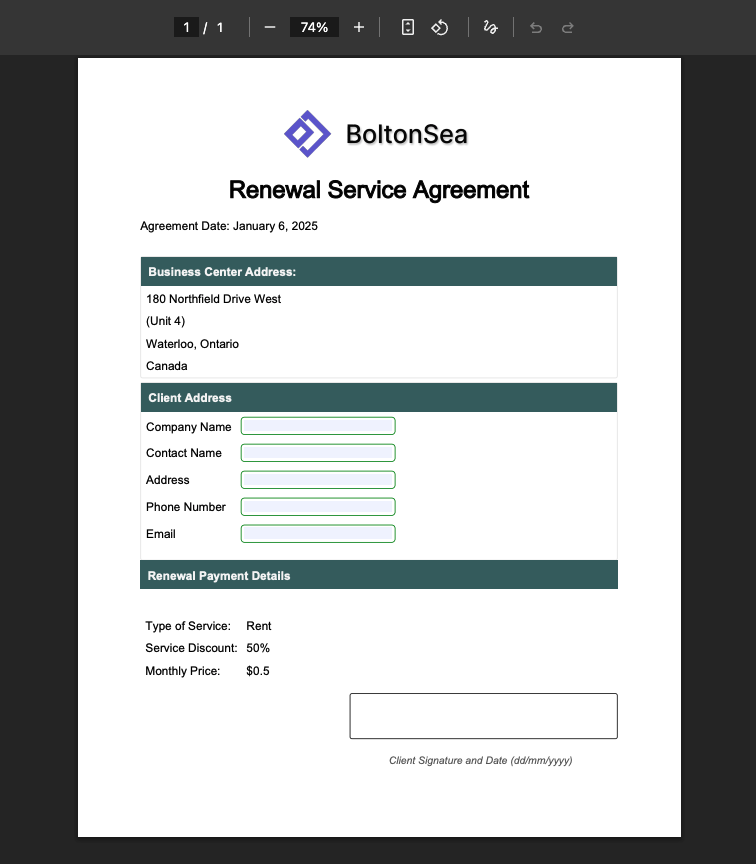
This article's example is based on the scenario to create a rental agreement. By utilizing HTML to PDF conversion, you can create professional, fillable documents suitable for notarization and legal use. Please find the drafted agreement in HTML below for your review.
You can also refer to the quick installer guide available at [Link to Guide] for additional details.
API Endpoint: http://localhost:9200/media/document/html_to_pdf_template
Request Body The complete HTML body is present at the bottom of this article.
{ media_group_id: "1", file_name: "rent_renewal", html_content: "<div>Empty WebPage HTML .... </div>",}
Response Body Response with the URL of the created 'PDF document'.
{ "id": 1, "width": 0, "height": 0, "maintain_aspect_ratio": false, "is_parent_file": false, "mime_type": "application/pdf", "private_url": "http://localhost:9200/media/file/1/2026/01/pviucoc525r9i4ro176893530770996561.pdf", "public_url": "http://localhost:9200/media/file/1/2026/01/pviucoc525r9i4ro176893530770996561.pdf", "original_file_name": "rent_renewal.pdf", "file_size": 5818, "created_on": "2026-01-20T18:55:07.707+00:00"}
<!DOCTYPE html><html lang="en">
<head>    <meta charset="UTF-8" />    <style>        @page land {            size: landscape;        }
        @page port {            size: portrait;        }
        body {            page: port;        }
        .header {            text-align: center;        }
        .brand a {            text-decoration: none;        }
        h1 {            font-weight: 500;        }
        .main_container {            page: port;            font-family: sans-serif;            width: 17.06cm;
            padding: 16px;            margin: 0 auto;
            margin-top: 32px;        }
        .content-container {            margin-top: 32px;            gap: 10px;        }
        .content {            margin-top: 5px;            border: 1px solid #e4e4e4;            border-radius: 3px;        }
        .content-title {            width: auto;            color: whitesmoke;            font-weight: 200;            background-color: #3e6667;            padding: 10px;        }
        .form-group {            padding: 5px;        }
        td {            padding: 5px;        }
        input[type="text"],        input[type="number"] {            width: 200px;            padding: 3.5px;            border: 1px solid green;            border-radius: 5px;        }
        .signature_line {            height: 60px;            border: 1px solid black;            border-radius: 3px;        }
        .signature_line,        #signature_label {            width: 360px;            margin-top: 15px;            margin-left: auto;        }
        #signature_label {            color: #5d5d5d;            font-style: italic;            text-align: center;            font-size: 14px;            padding: 5px;            width: calc(360px - 5px);        }    </style></head>
<body>    <div class="main_container">        <div class="header">            <div>                <div class="brand" style="align-content: center">                    <a href="https://boltonsea.com">                        <img src="https://s3.us-east-1.amazonaws.com/io.boltonsea.com/dev/logo/2025/boltonsea_logo2.png" style="width: 250px; margin: 0 auto" />                    </a>                </div>
                <div>                    <h1>Renewal Service Agreement</h1>                </div>            </div>
            <div style="text-align: left">                <span>Agreement Date: January 6, 2025</span>            </div>        </div>
        <div class="content-container">            <div class="content">                <div class="content-title">                    <strong>Business Center Address:</strong>                </div>
                <table>                    <tr>                        <td>180 Northfield Drive West</td>                    </tr>                    <tr>                        <td>(Unit 4)</td>                    </tr>                    <tr>                        <td>Waterloo, Ontario</td>                    </tr>                    <tr>                        <td>Canada</td>                    </tr>                </table>            </div>
            <div class="content">                <div class="content-title">                    <strong>Client Address </strong>                </div>
                <form>                    <table>                        <tr>                            <td>Company Name</td>                            <td>                                <input type="text" class="form-control" id="company_name" />                            </td>                        </tr>                        <tr>                            <td>Contact Name</td>                            <td>                                <input type="text" class="form-control" id="contact_name" />                            </td>                        </tr>                        <tr>                            <td>Address</td>                            <td>                                <input type="text" class="form-control" id="address" />                            </td>                        </tr>                        <tr>                            <td>Phone Number</td>                            <td>                                <input type="number" class="form-control" id="phone" />                            </td>                        </tr>                        <tr>                            <td>Email</td>                            <td>                                <input type="text" class="form-control" id="email" />                            </td>                        </tr>                    </table>                </form>            </div>        </div>
        <div>            <div class="content-title">                <strong>Renewal Payment Details</strong>            </div>
            <div class="content-container">                <div>                    <table>                        <tr>                            <td>Type of Service:</td>                            <td>Rent</td>                        </tr>                        <tr>                            <td>Service Discount:</td>                            <td>50%</td>                        </tr>                        <tr>                            <td>Monthly Price:</td>                            <td>$0.5</td>                        </tr>                    </table>                </div>
                <div class="signature_line"></div>                <div id="signature_label">Client Signature and Date (dd/mm/yyyy)</div>            </div>        </div>    </div></body>
</html>
Should you have any inquiries or require assistance, please contact us through the contact-us page.